

Point of sale · Kitchen · Stock · Staff · Reports
Everything your restaurant runs on, in one system
A till your waiters can actually use, a kitchen that prints its own tickets, a drawer that gets counted, and an owner's report that adds up at the end of the night. Built in Nairobi, for how restaurants here really trade.
No sign-up — every role has a one-tap login in the demo.

In service
Running a Nairobi restaurant's full service since July 2026
17 staff
Owners, managers, waiters, cashiers, kitchen and cleaners, each on their own access
Unattended
Kitchen and counter tickets print themselves — nobody stands at a screen
01—The till
Ring it up without thinking about it
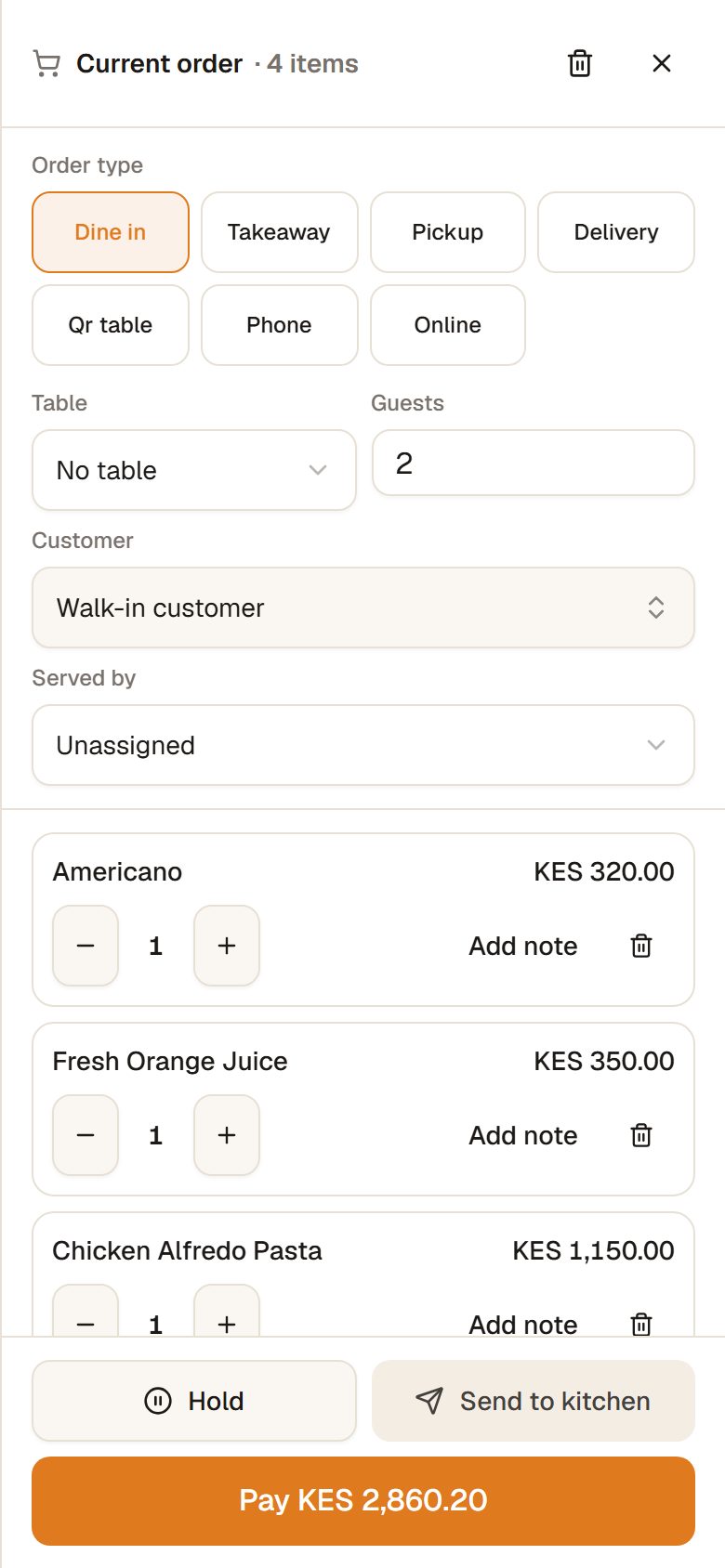
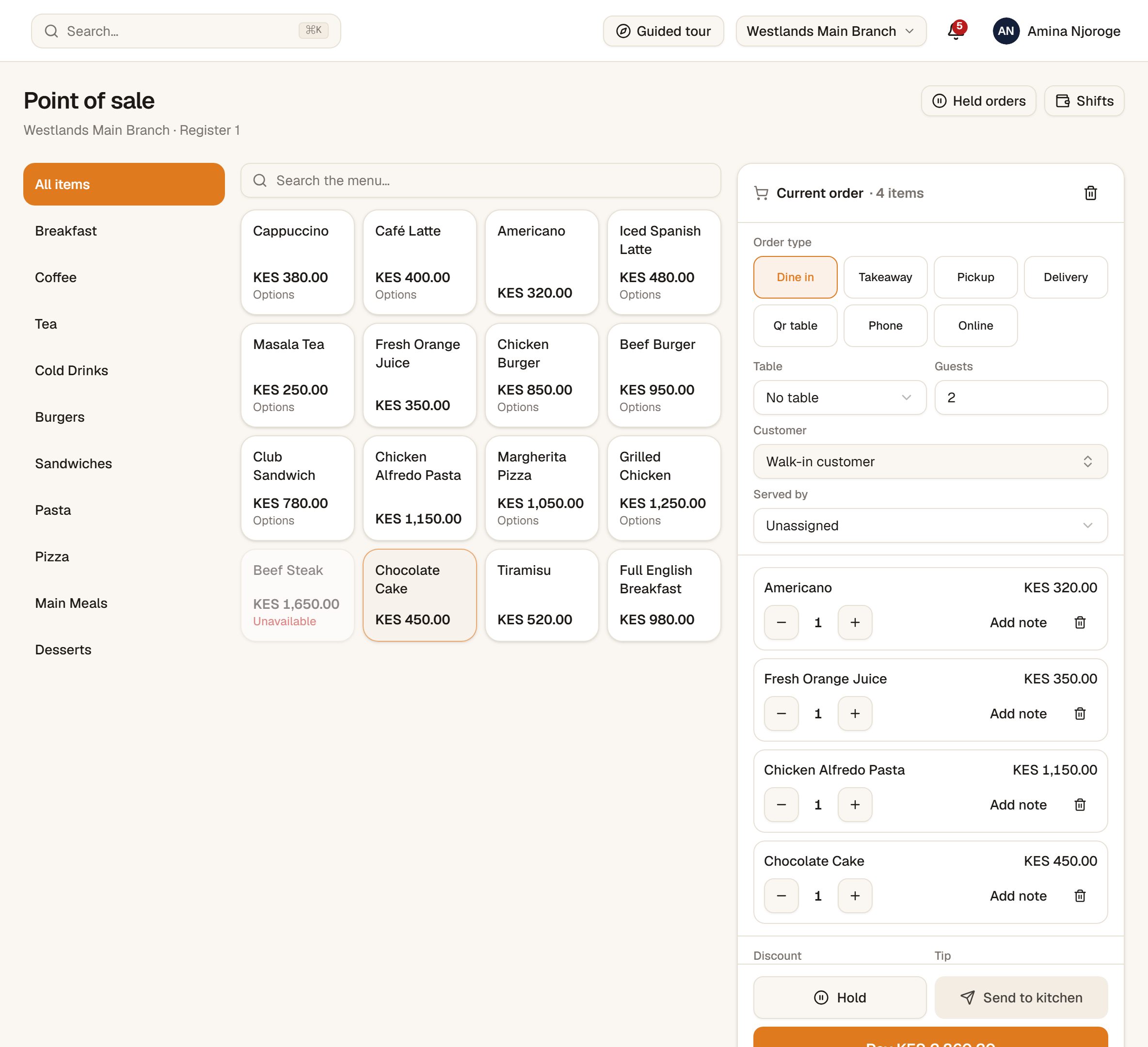
The screen a waiter uses two hundred times a night is the one that has to be boring and fast. Tap the dish, answer the choices it needs, send it. The kitchen has it before the waiter has walked away from the table.
Choices are enforced, not remembered
A steak cannot be sent without a cook. A required choice blocks the line, so the pass never has to phone the floor.
Add a round to a check that is already open
Second drinks go on the same bill and only the new lines print. The kitchen never re-cooks a starter.
Split the payment across methods
Part cash, part M-Pesa, part card. The sale will not close until the balance is zero.
A waiter sees their own checks
Not the whole floor's. Your own tables, your own takings, and nobody closing a bill they did not open.
02—The pass
The kitchen prints its own tickets
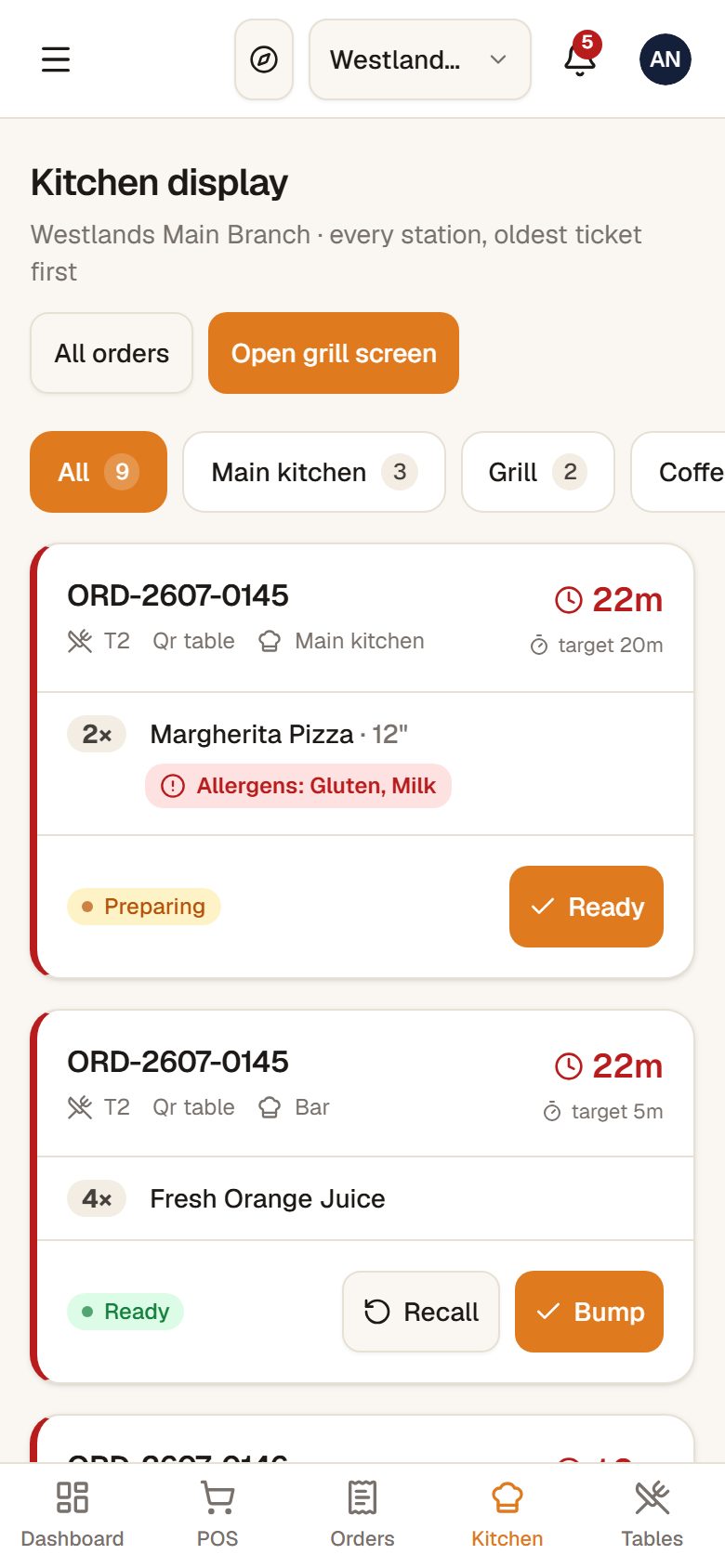
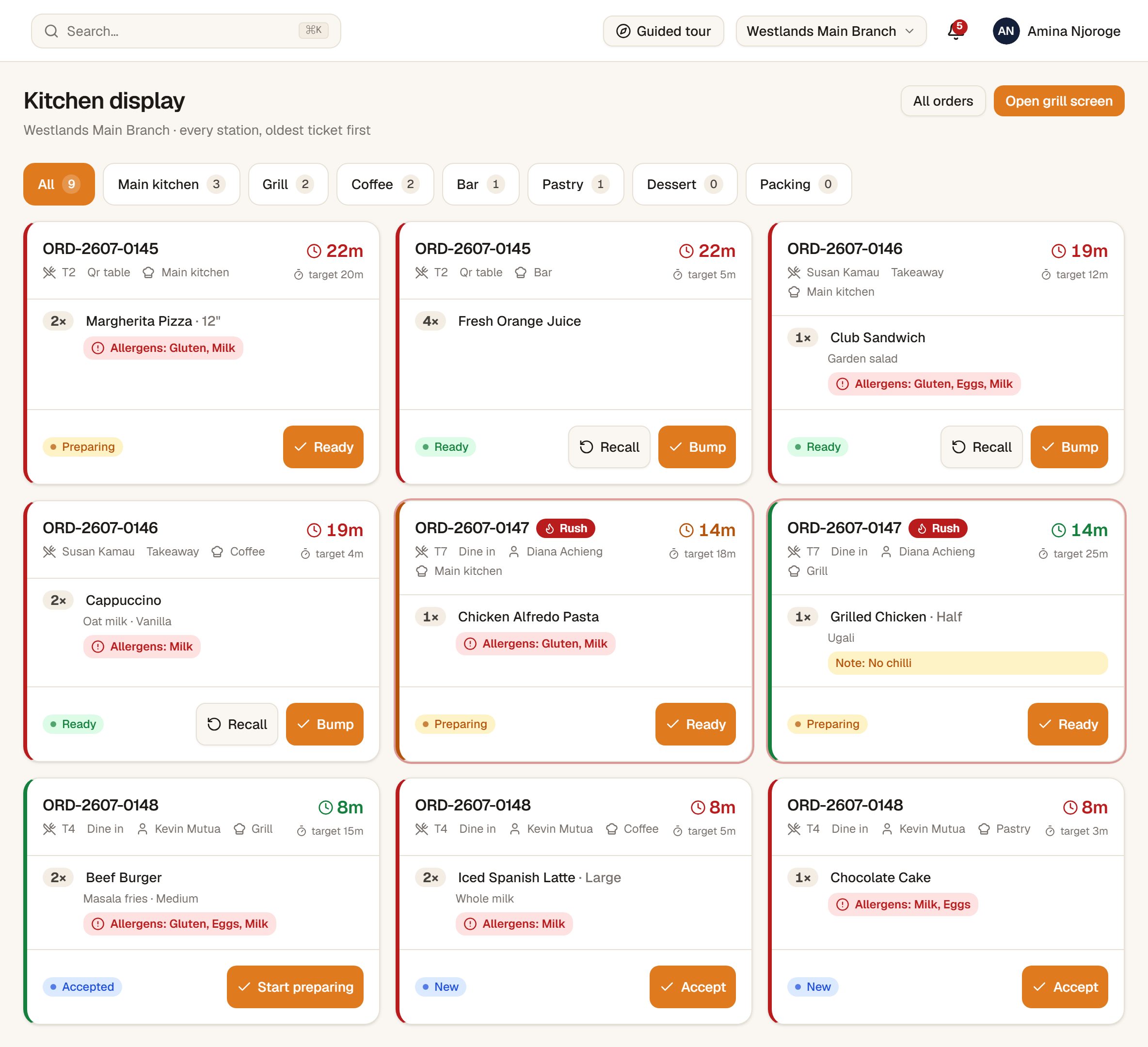
A line sent from the floor lands on the right station's board and comes out of the right printer, on its own, with nobody watching a screen. Hot kitchen, cold counter, bar — each gets only what it is cooking.
Routed by station, not by shouting
Grill, cold counter and bar each see their own tickets and their own counts. One order, three tickets, no argument.
Prints unattended, all service
A small agent on the till machine drives the thermal printers. Proven on site on Epson TM-series hardware.
A ticket has a state, not a vibe
New, accepted, preparing, ready, bumped — and a bumped ticket can be recalled when a plate comes back.
Recipes and plate costingDemo
Build a dish from its ingredients and see what the plate costs before you price it.
03—The money
Every shilling has a name on it
The difference between a restaurant that makes money and one that leaks it is usually not the menu. It is who could take a payment, who could void a line, and whether anyone counted the drawer.
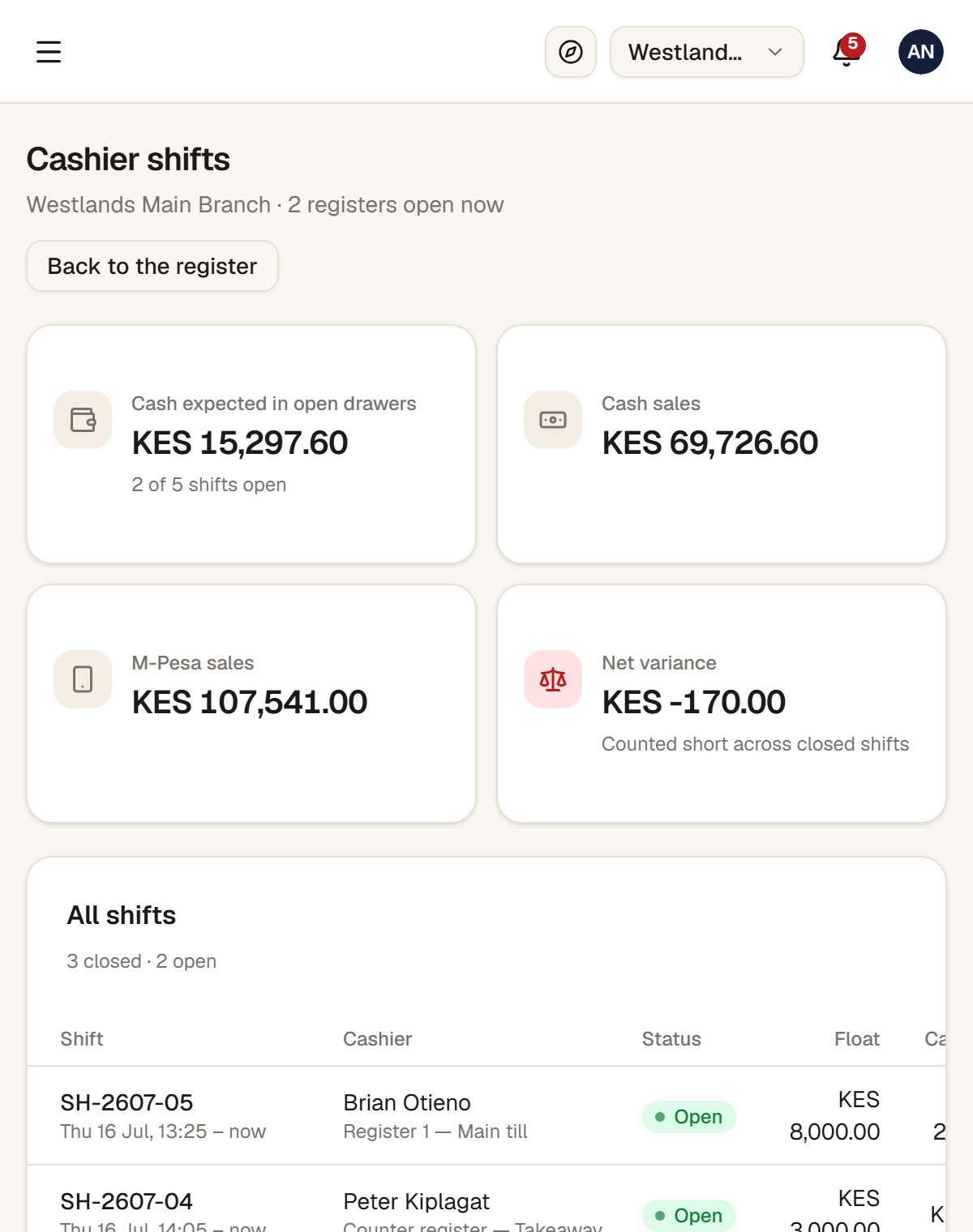
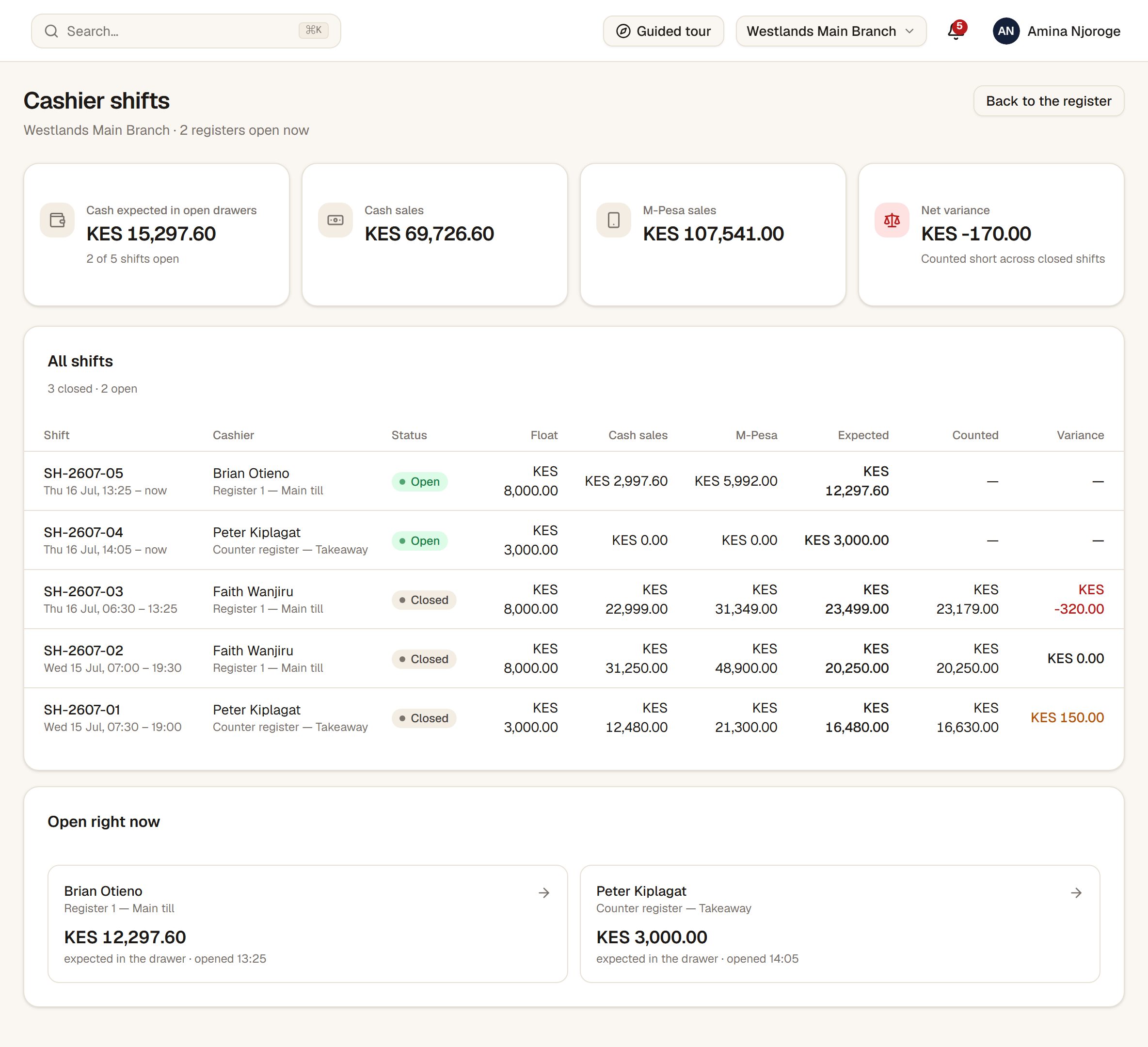
The drawer is opened, counted and closed
Float in, cash counted out, variance calculated. A shift cannot be walked away from — and staff cannot be clocked out while they still hold an open drawer.
Voids, discounts and cancellations need a manager
A cashier can ring up all night and still cannot quietly remove a line. The manager's PIN authorises it, and the system records who gave it.
House accounts with a PIN at the till
Regulars and staff eat on account. The customer enters their own PIN to charge it, and every balance has a ledger you can open.
M-Pesa recorded at the till
M-Pesa sits alongside cash and card as a payment method on the check, so your takings break down by how each bill was actually paid.
An STK prompt on the customer's phoneComing
Push the amount straight to their handset instead of reading a till number out loud. Built and waiting on your Daraja go-live.
04—The people
Three kinds of staff, and none of them share a login
A restaurant is not an office. Some staff have a password, some have four digits, and some should never open the app at all — but you still owe them their hours.
A username and a PIN at the till
No passwords typed on a greasy tablet mid-service. Managers get a full login; till staff get a PIN.
Clock in before the app does anything
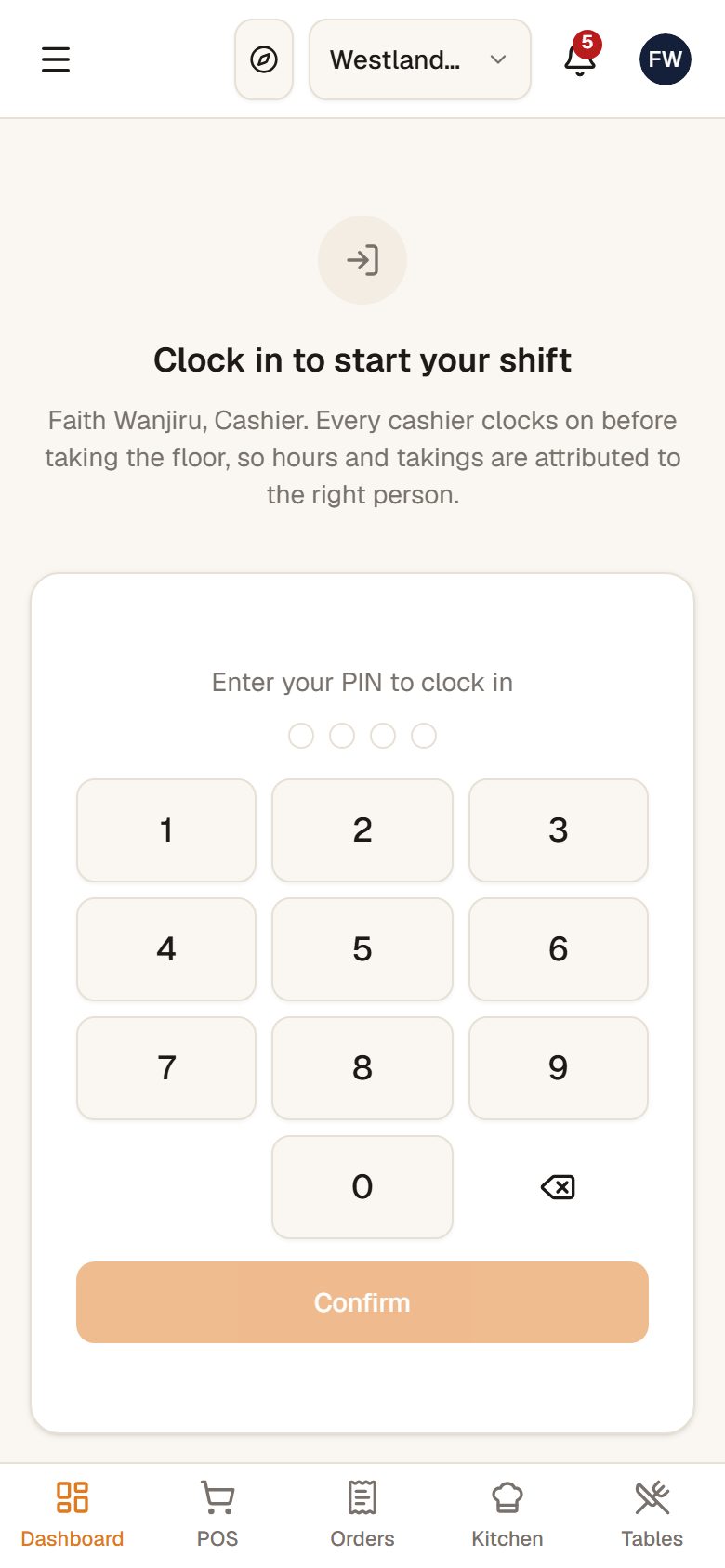
Waiters, cashiers and storekeepers hit a clock-in wall first. No hours, no till.
A public clock screen for staff with no login
Cleaners punch a PIN on a screen that opens nothing else. They are on the payroll without being on the system.
Fix a wrong clock-out, with a reason
A finished shift can be corrected by a manager. The reason is compulsory and it is written into the record — because that note is the whole audit trail.
Archive, never delete
Somebody who leaves keeps their hours, their shifts and their name on the checks they served. Their login stops working the same minute.
Access
Your cashier sees a till. You see the business.
Access is not a checkbox that hides a button. Roles are real records, permissions are granted per restaurant, and the check happens on the server — so a link typed by hand gets refused the same way a hidden menu item does.
Thirteen roles, from owner down to cleaner, each with its own landing screen.
A module you did not take beats any permission you were granted — nobody can reach it, not even the owner.
Read-only where it should be read-only: a manager can open your settings and read them without being able to change them.
Every approval, cancellation, role change and archive is written to an audit trail with a name on it.
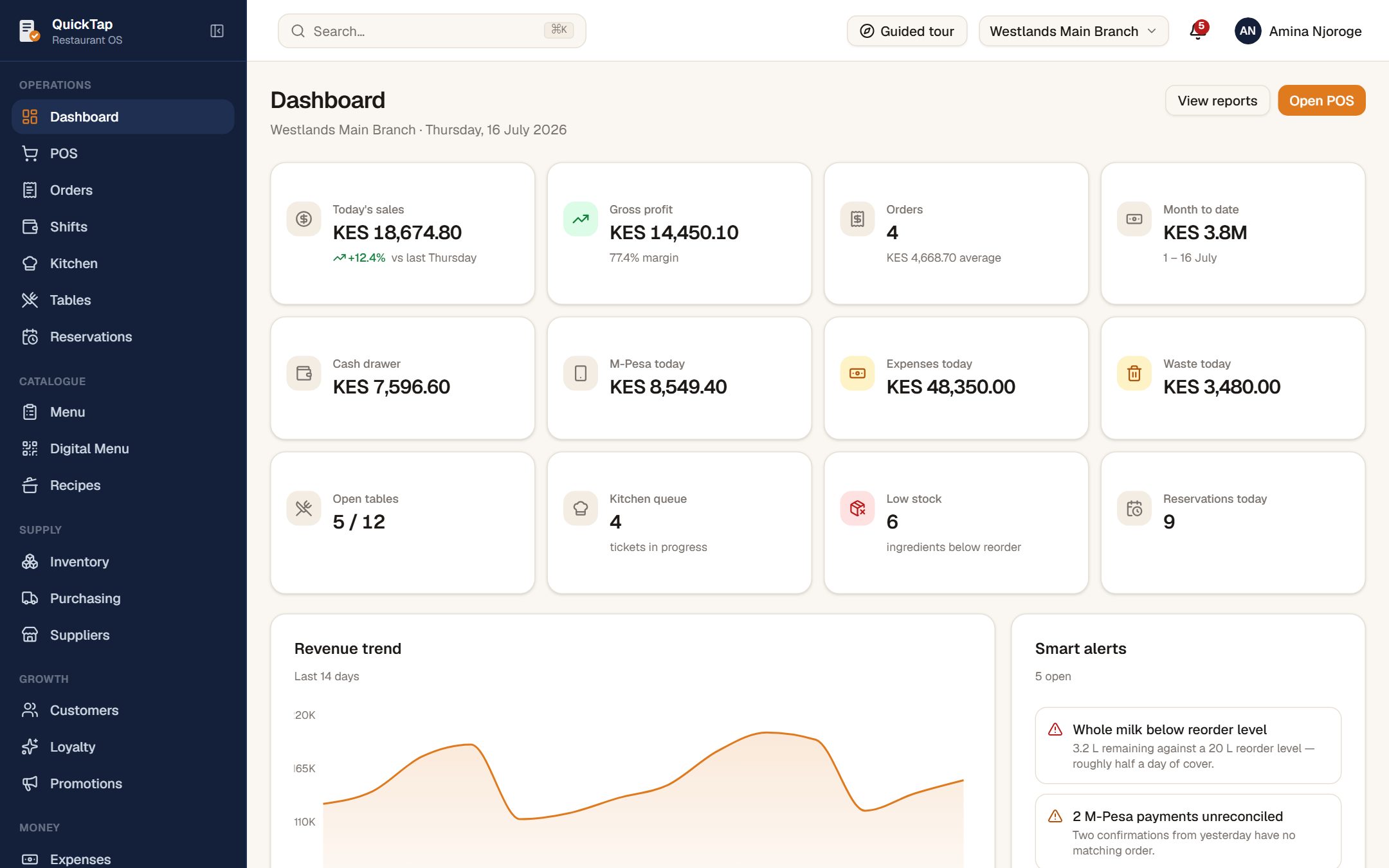
Every branch, every report, every setting
The whole sidebar. Takings, drawers, stock and staff across the business, from one login.
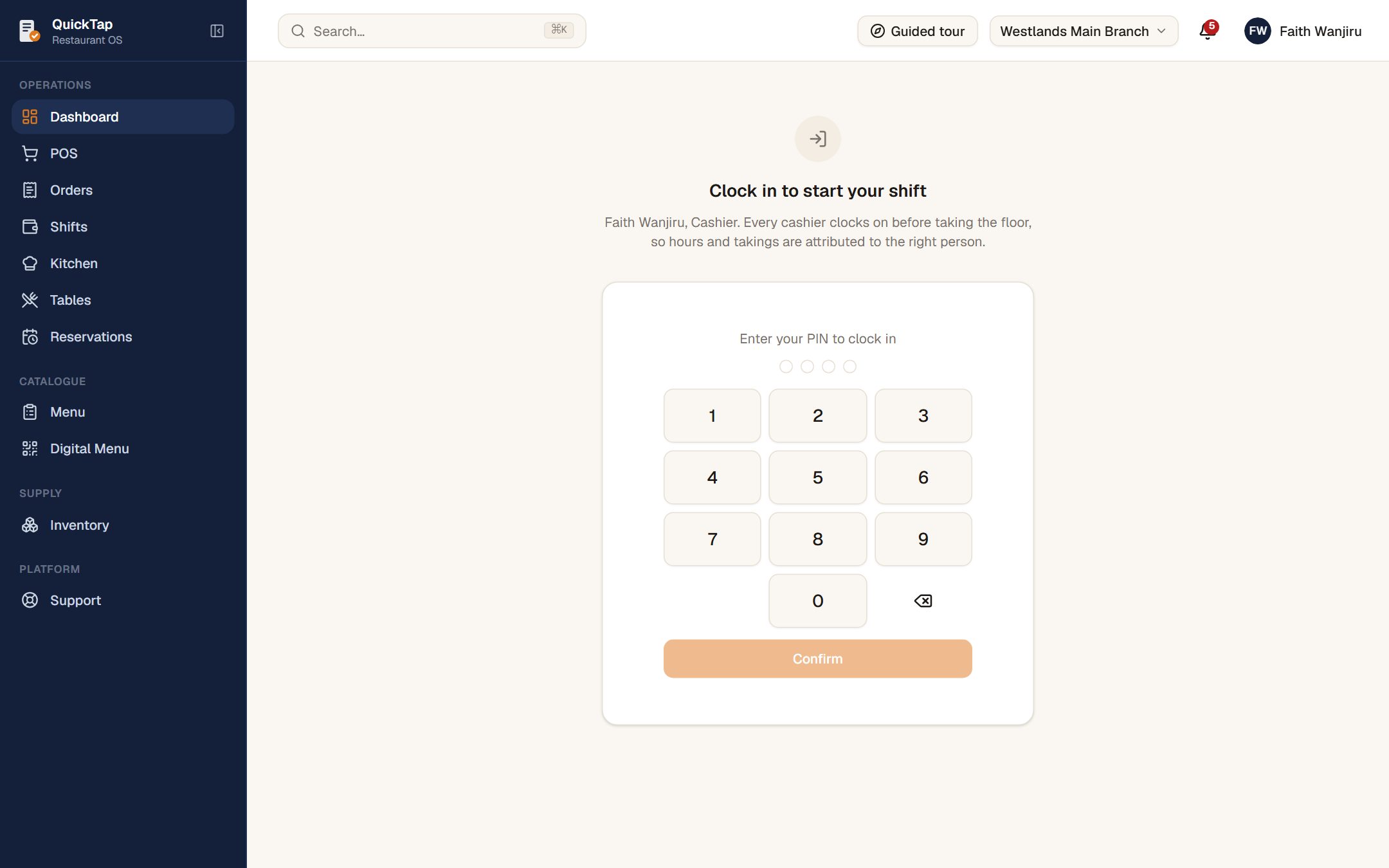
Clock in first — then the till
A cashier's first screen is a PIN pad. No hours, no till. The sidebar holds the floor and nothing else: no reports, no settings, no staff.
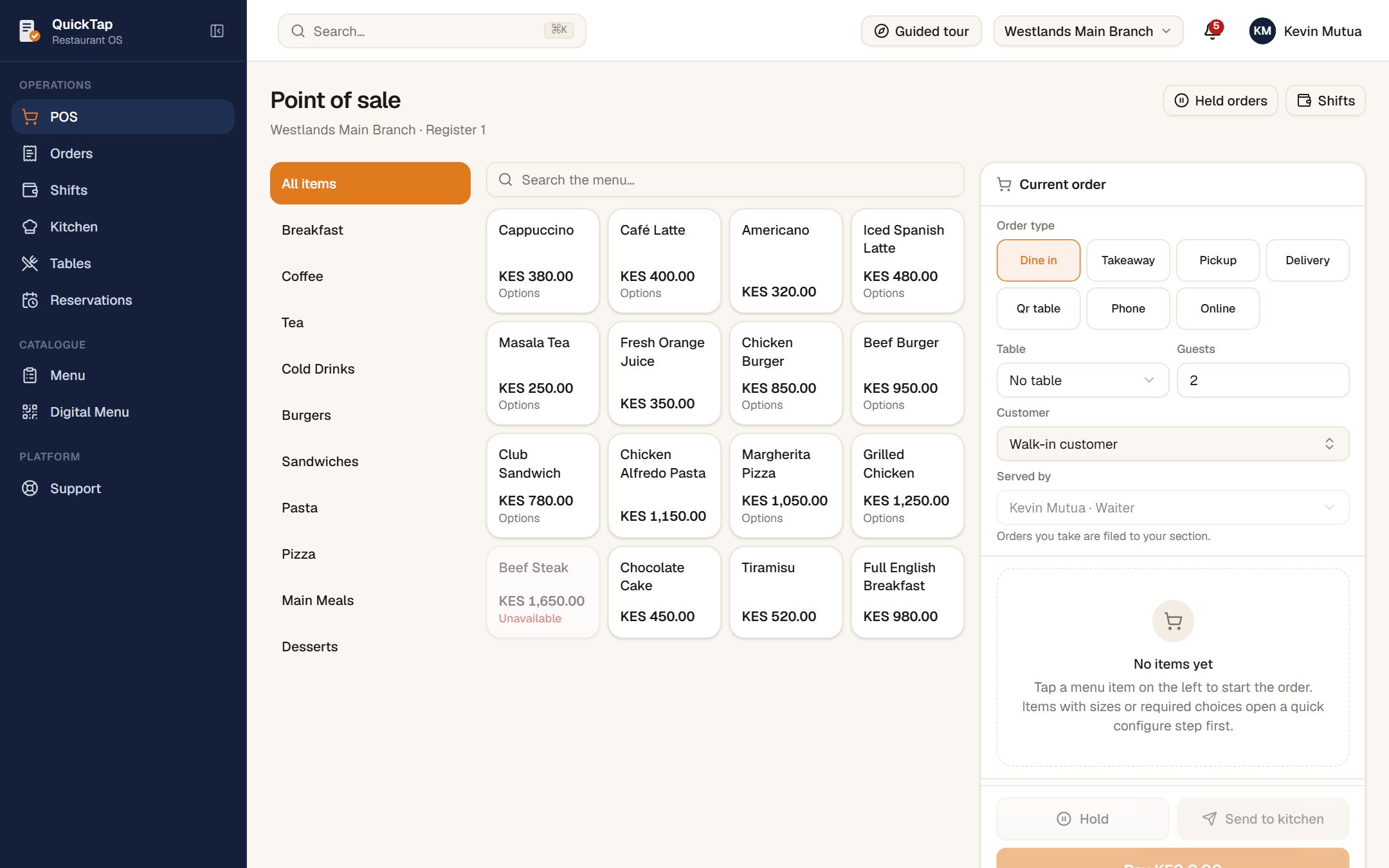
Straight onto the till, in their own name
Once clocked in, a waiter lands on the POS with themselves already set as the server, so every check is filed to their section.
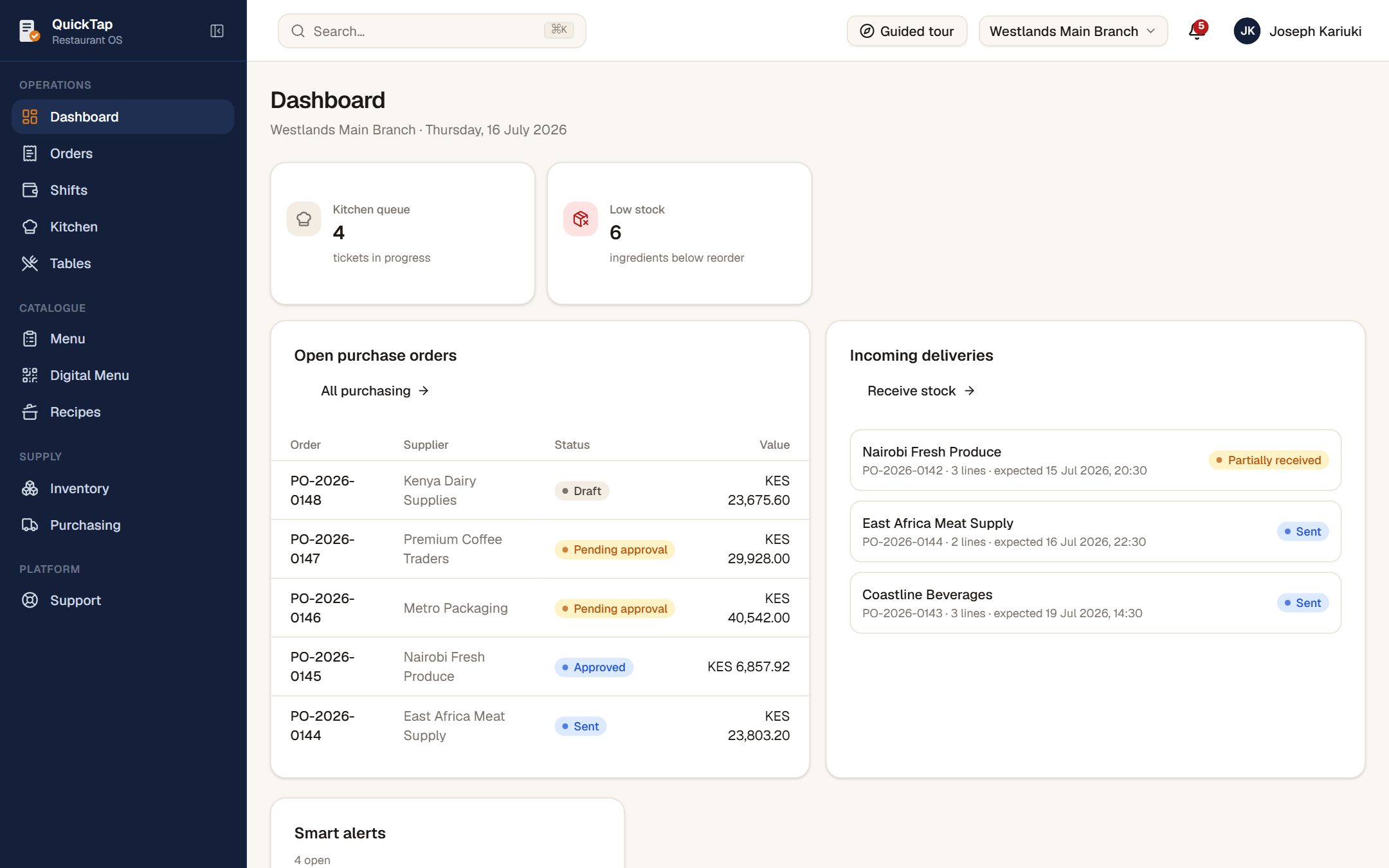
The pass and what's in the storeDemo
The kitchen queue, ingredients running low, and the deliveries on their way in. No till and no reports.
More of the app
Every screen is the real one
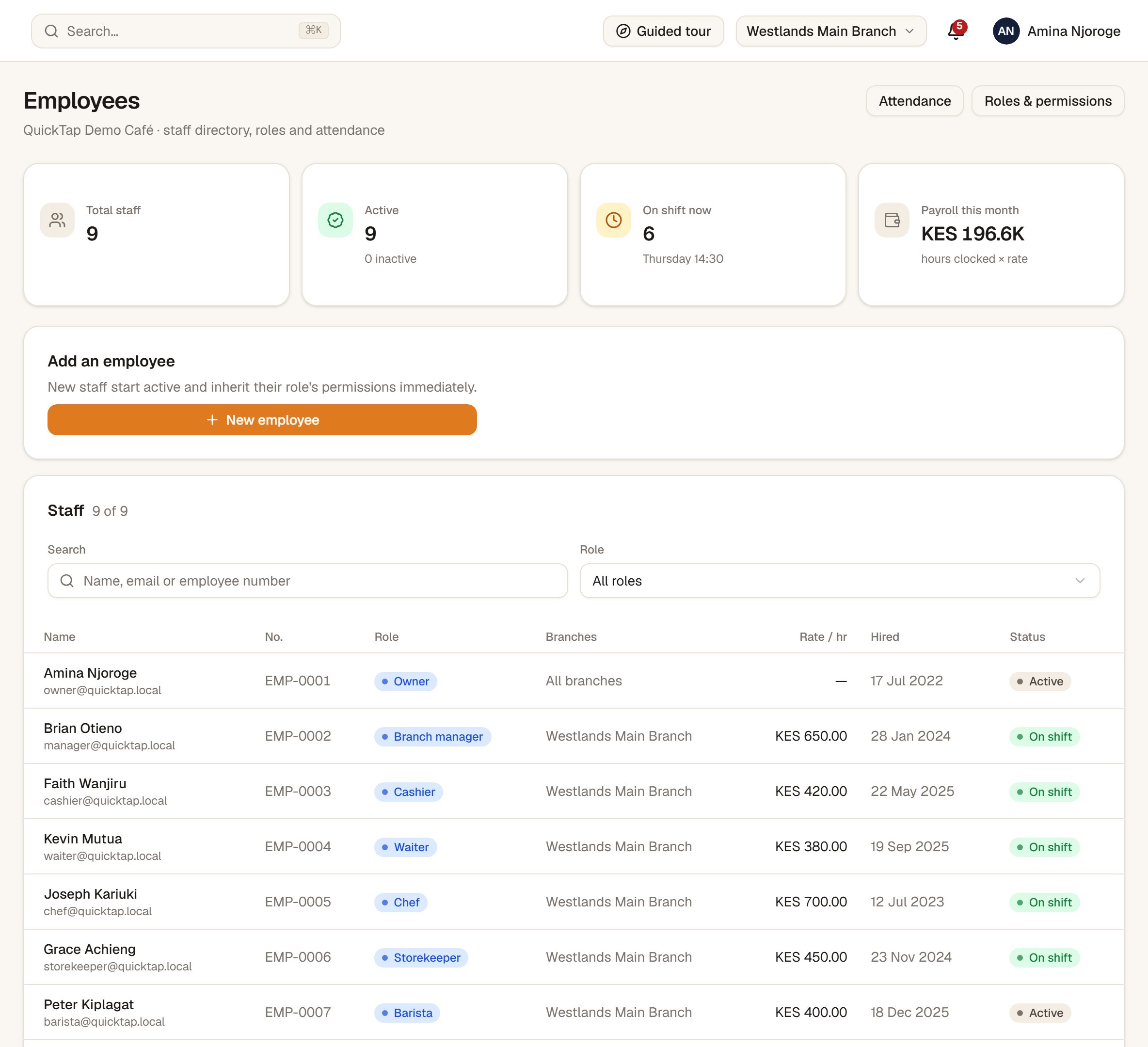
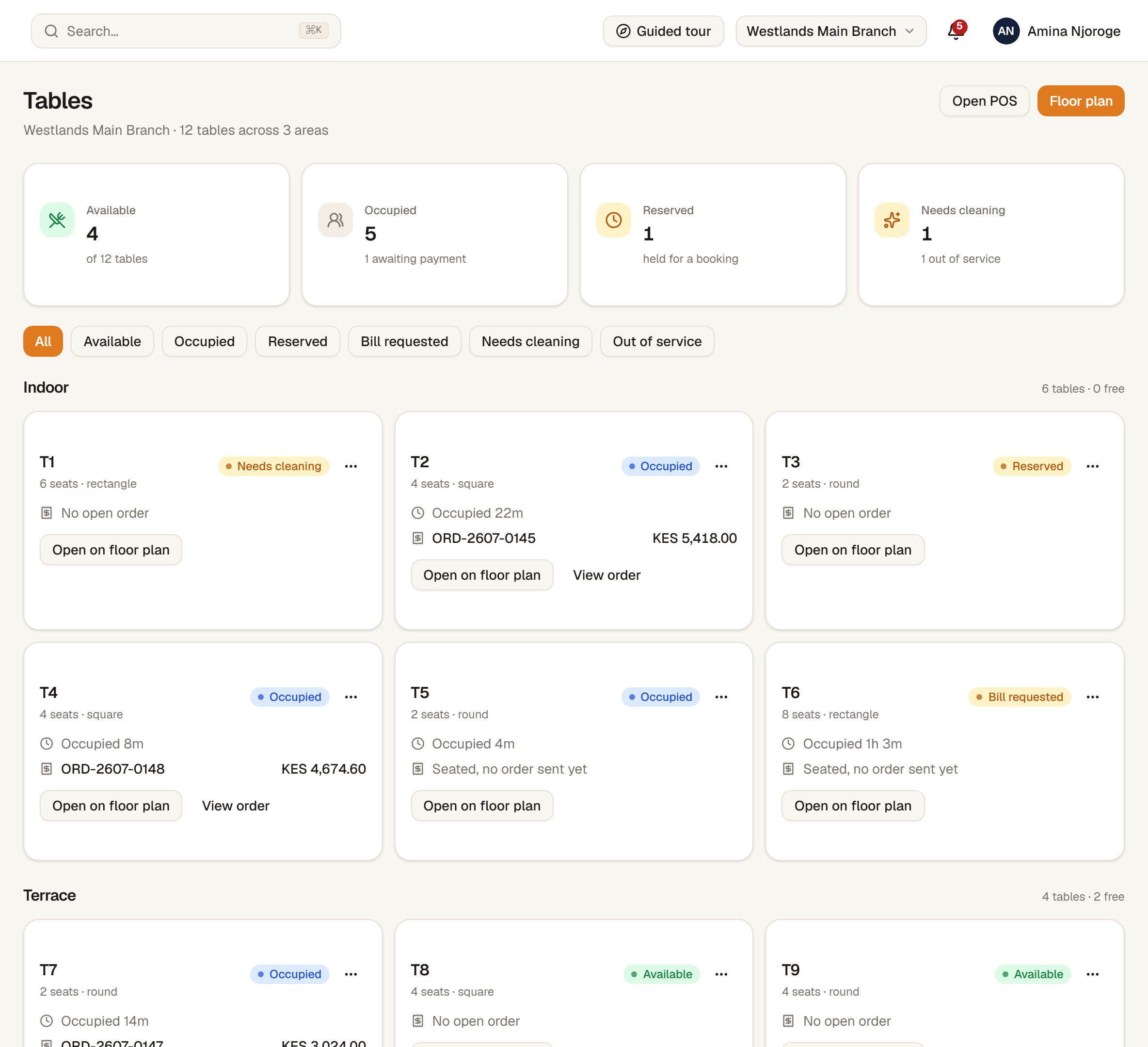
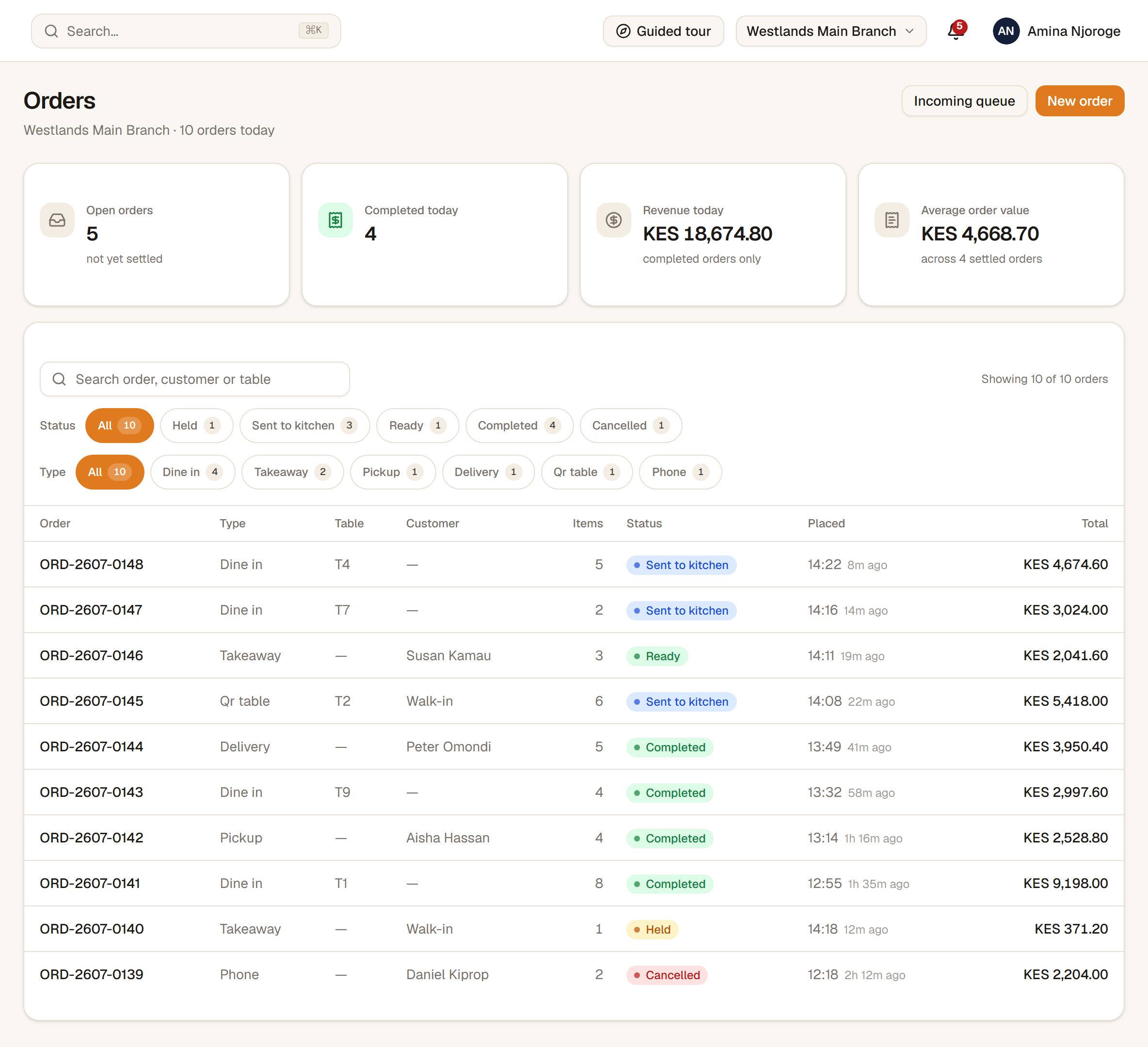
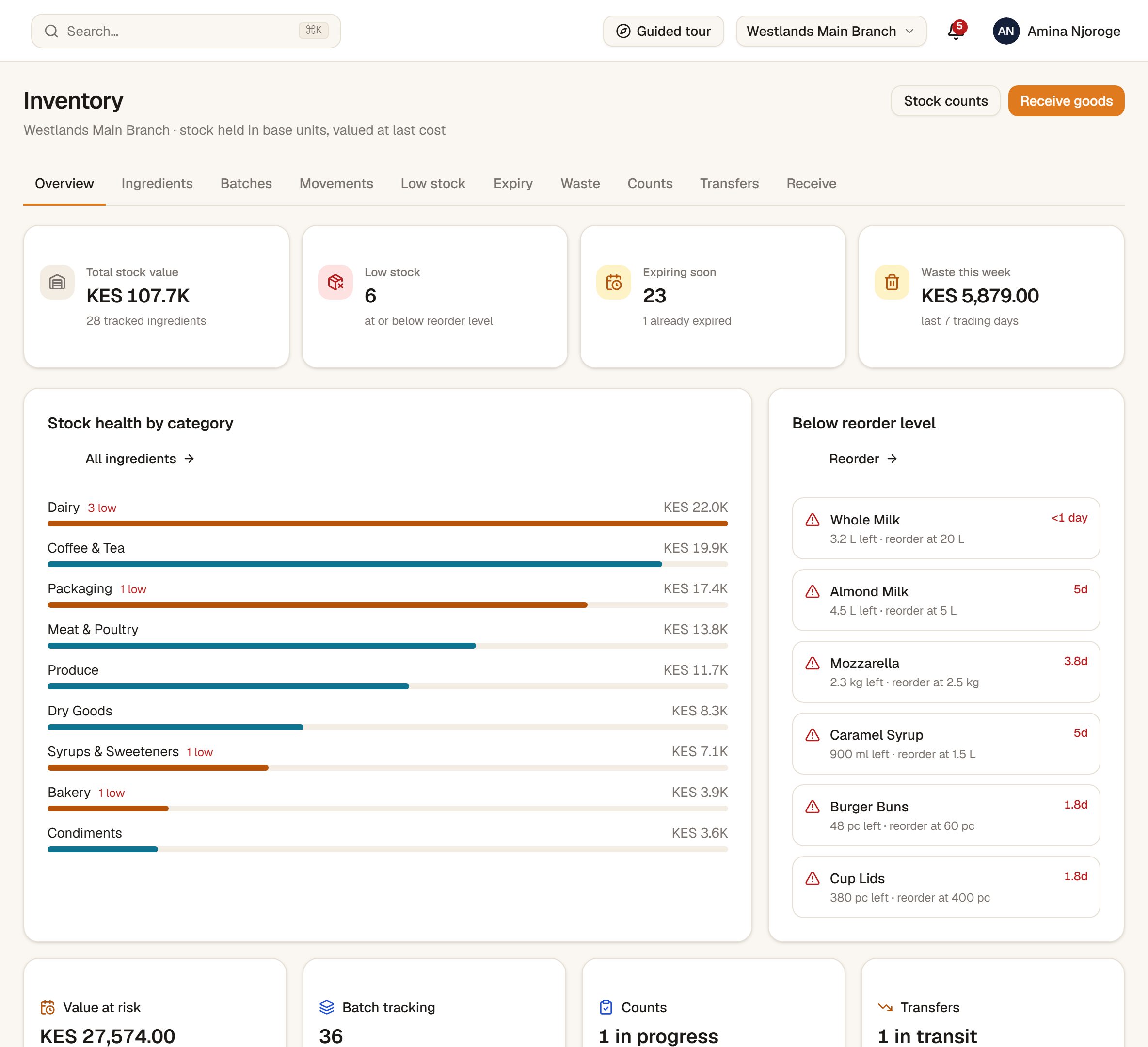
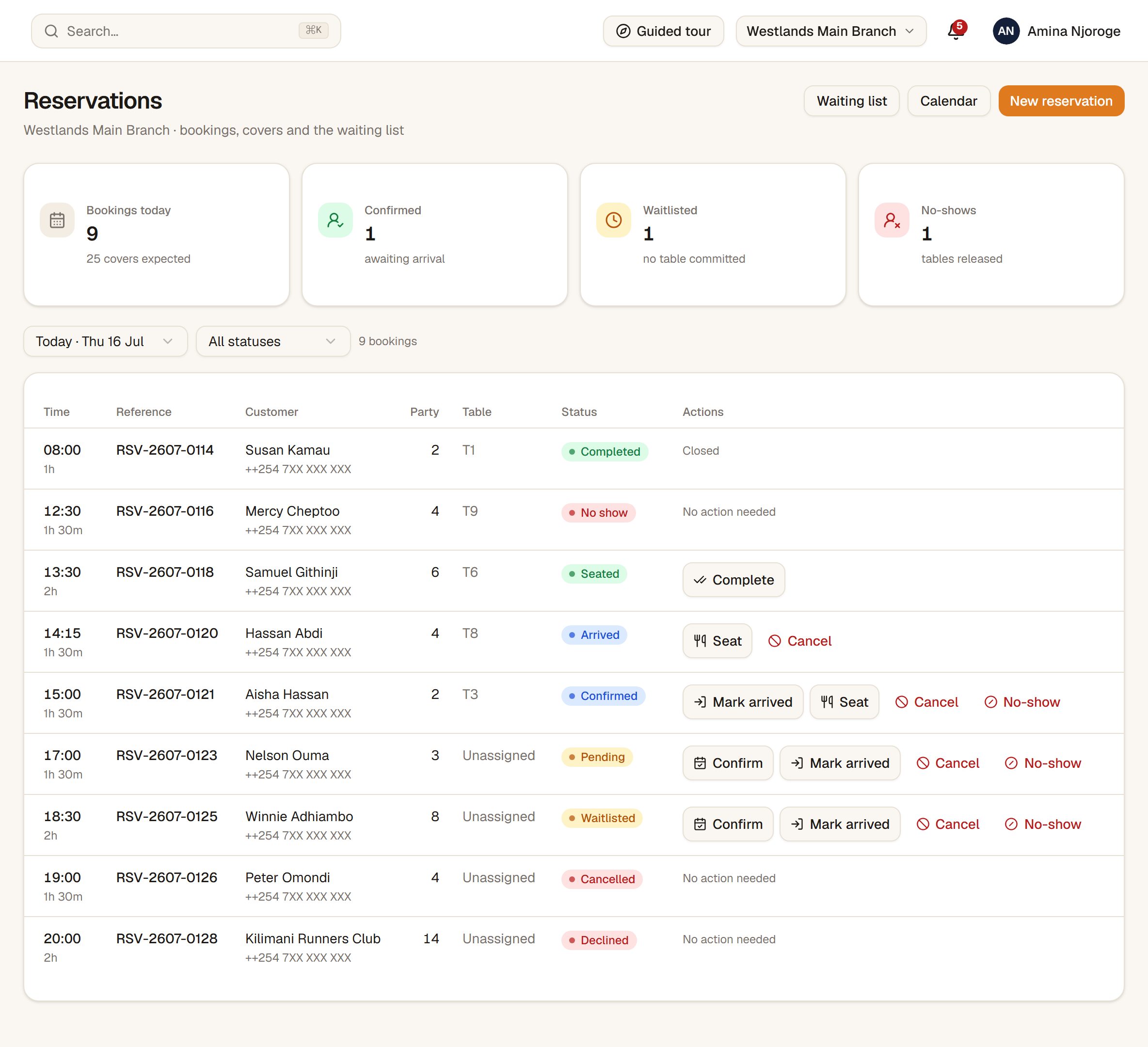
Nothing below is a mock-up. These are captures of the demo you can open yourself — same buttons, same numbers.
Every table by area and status, with its open check and how long it has been seated.
Every check, open or closed, with its table, channel, server and what is still owed.
Stock by category, what is below reorder level, what expires soon and what was wasted.Demo
Tonight's bookings and covers, with the waitlist beside them.Demo
What's in it
Take the parts you need
Everything here is built and you can drive it in the demo. The ones tagged Demo are not yet running at a live restaurant — we turn modules on per client, and a module you have not taken is gone from the app entirely, for everyone, including you.
Service
Point of sale
Dine-in, takeaway and delivery, with modifiers and split payments.
Orders
Every check open and closed, settled, carried over or cancelled.
Kitchen display
Station boards with live counts and a full ticket state machine.
Tables
Your floor plan, by area, with the table on the check.
ReservationsDemo
Bookings, waitlist and covers for the night.
Digital QR menuDemo
The guest-facing menu, generated from the same catalogue.
Money
Shifts and drawers
Float, counted cash, variance and close-out per cashier.
Credit accounts
House accounts, balances, repayments and a per-customer PIN.
Reports
Sales by day, by range, by item, by category — and a CSV of any of it.
ExpensesDemo
Operating costs and recurring bills against the takings.
ForecastingDemo
Menu intelligence, pricing and demand forecasting.
Supply
Stock
What you buy, counted per branch, on an append-only ledger.
Stocktakes
A count posts the variance — it never silently overwrites the shelf.
Recipes and costingDemo
Ingredients per dish, plate cost and prepared batches.
PurchasingDemo
Purchase orders, approvals and goods receiving.
SuppliersDemo
Supplier directory and running balances.
People and growth
Staff and roles
Hire, assign, suspend and archive across thirteen roles.
Attendance
Clock in and out, on behalf or by PIN, corrected with a reason.
CustomersDemo
Guest records, segments and campaigns.
LoyaltyDemo
Points, tiers and rewards.
PromotionsDemo
Offers and vouchers across the menu.
Multi-branchDemo
Second and third sites, compared against each other.
Built here
Made for how Nairobi actually trades
Most restaurant software is a translation of an American till. This one was written against a Kenyan service, on Kenyan hardware, with a Kenyan trading day.
Your day ends when service ends
A venue trading to 4am gets one night's takings, not two half-nights split at midnight. Everything is pinned to Nairobi time.
KES, and the money is exact
Prices, service charge and VAT are computed in exact decimals, never in floating point. Your totals agree with the printed bill to the cent.
The printers you already own
Standard 80mm thermal receipt printers over USB or a shared Windows queue. Proven in service on Epson TM-series.
The devices you already have
It runs in a browser on the counter PC, an office tablet or a phone in a waiter's apron. There is nothing to install on the floor.
Getting started
We set it up with you, not for you
- 1
We load your menu
Your categories, dishes, sizes and add-ons, priced as you actually sell them. You send us the menu you have — a PDF, a spreadsheet, a photo of the board.
- 2
We set up your people
Your roles, who may discount, who may void, who counts the drawer. Managers get a login, till staff get a PIN, and anyone who should not open the app gets a clock screen instead.
- 3
We wire the printers
Kitchen, bar and counter, printing on their own. We do this on site with your hardware, during a quiet hour, not over the phone.
- 4
We stand behind the counter with you
First service is run together. Then you keep the number you have been messaging all along.
Try it now
Two minutes behind the counter
No sign-up. The login screen lists one account per role — tap Fill form next to any of them, then Sign in.
- 1Open the demo and pick Owner — you land on a restaurant mid-service.
- 2Go to the POS, ring up a round and send it to the kitchen.
- 3Open the Kitchen screen and bump the ticket you just sent.
- 4Sign out and back in as Cashier — the same app, a much smaller menu.
QUICKTAP OS
DEMO SIGN-IN · NAIROBI
OWNEReverything
BRANCH MANAGERthe branch
CASHIERthe till
WAITERtheir tables
CHEFthe pass
STOREKEEPERthe stock
PASSWORDfilled in for you
TOTALKES 0.00
Every role lands on its own screen. Nothing you do in the demo is real — ring things up, void them, break it.
** ASANTE · KARIBU TENA **
Straight answers
Questions owners ask
What does it cost?
It depends on how many tills you run, how many sites, and which modules you take. Message us with your setup and you get a straight number, not a form.
Can I keep my M-Pesa till number?
Yes. Your till stays yours. M-Pesa payments are recorded against the check, so a day's takings show you exactly how much of it came in by M-Pesa and how much in cash.
What hardware do I need?
A computer or tablet with a browser at the counter, and a thermal receipt printer per station you want printing. If you already run a POS you almost certainly have both.
Can I see it before I commit?
Open the demo above and drive it — a full restaurant mid-service, with sign-ins for every role. Nothing you do in it is real, so break it.
What happens to my data if I leave?
It is yours. Sales, staff hours and stock movements export to CSV from inside the app, whenever you want them, without asking us.
Do I have to take all of it?
No, and most restaurants should not. We switch on the modules you asked for; the rest are not in your app at all. You can add one later without a reinstall.
See it running before you decide anything
Open the demo yourself, or send us a message and we will walk your own menu through it.